
eSIM card from Walutomat
Download the app and order an eSIM card


eSIM card – discover the benefits

Internet on the go
without a physical SIM card

Data packages
from as little as 0,01 PLN per country*


Over 200 countries
and regions to choose from

Quick setup
-
Convenience
It only takes a few clicks to order and activate your eSIM. You don’t have to queue for a physical SIM card.
-
Unlimited contact with family and friends
Keep your number on WhatsApp, and use Instagram, Facebook and other social media.
-
Availability
Buy and activate online whenever you like, 24/7.
-
Entertainment at your fingertips
Netflix, HBO or Spotify whilst travelling? Watch films, TV series and listen to music just like at home.
-
Wide range of options
Choose a data package from 1 to 50 GB. For use in a specific country or region of the world. 1 GB packages starting from just 0,01 PLN.*
-
Fast internet even in the middle of nowhere
5G speeds.
-
Control your spending
Forget about high roaming charges; check your current data usage in the app.
-
Security
The digital eSIM connects to the chip built into your phone. It can’t be lost or damaged.


* Limited offer. See details in the terms and conditions
Check the eSIM price list
Choose an eSIM package tailored to your needs.

-
Turkey
from 9,00 PLN
Regular price (without promotion)
-
Egypt
from 15,00 PLN
Regular price (without promotion)
-
United States
from 12,00 PLN
Regular price (without promotion)
-
Albania
from 11,00 PLN
Regular price (without promotion)
-
United Kingdom
from 11,00 PLN
Regular price (without promotion)
-
Poland
from 10,00 PLN
-
Thailand
from 12,00 PLN
Regular price (without promotion)
-
Switzerland
from 11,00 PLN
-
Tunisia
from 12,00 PLN
Regular price (without promotion)
-
Montenegro
from 12,00 PLN
Regular price (without promotion)
-
Morocco
from 15,00 PLN
Regular price (without promotion)
-
Japan
from 9,00 PLN
Regular price (without promotion)
-
Georgia
from 12,00 PLN
Regular price (without promotion)
-
China
from 14,00 PLN
Regular price (without promotion)
-
Germany
from 10,00 PLN
-
Vietnam
from 14,00 PLN
Regular price (without promotion)
-
Mexico
from 14,00 PLN
Regular price (without promotion)
-
Kenya
from 17,00 PLN
-
Italy
from 10,00 PLN
-
Dominican Republic
from 19,00 PLN
-
Sri Lanka
from 13,00 PLN
-
United Arab Emirates
from 13,00 PLN
-
Spain
from 10,00 PLN
-
Maldives
from 35,00 PLN
-
Tanzania
from 20,00 PLN
-
Oman
from 11,00 PLN
-
Ukraine
from 5,00 PLN
Regular price (without promotion)
-
Afghanistan
from 25,00 PLN
-
Åland Islands
from 7,00 PLN
-
Albania
from 11,00 PLN
Regular price (without promotion)
-
Algeria
from 7,00 PLN
-
American Samoa
from 285,00 PLN
-
Andorra
from 17,00 PLN
-
Angola
from 60,00 PLN
-
Anguilla
from 14,00 PLN
-
Antigua and Barbuda
from 14,00 PLN
-
Argentina
from 13,00 PLN
-
Armenia
from 9,00 PLN
-
Aruba
from 21,00 PLN
-
Australia
from 6,00 PLN
-
Austria
from 10,00 PLN
-
Azerbaijan
from 13,00 PLN
-
Bahamas
from 14,00 PLN
-
Bahrain
from 12,00 PLN
-
Bangladesh
from 7,00 PLN
-
Barbados
from 14,00 PLN
-
Belarus
from 10,00 PLN
-
Belgium
from 10,00 PLN
-
Belize
from 52,00 PLN
-
Benin
from 22,00 PLN
-
Bermuda
from 29,00 PLN
-
Bolivia
from 18,00 PLN
-
Bonaire
from 14,00 PLN
-
Bosnia and Herzegovina
from 7,00 PLN
-
Botswana
from 26,00 PLN
-
Brazil
from 10,00 PLN
-
British Virgin Islands
from 14,00 PLN
-
Brunei Darussalam
from 17,00 PLN
-
Bulgaria
from 10,00 PLN
-
Burkina Faso
from 24,00 PLN
-
Burundi
from 74,00 PLN
-
Cabo Verde
from 29,00 PLN
-
Cambodia
from 15,00 PLN
-
Cameroon
from 24,00 PLN
-
Canada
from 15,00 PLN
-
Cayman Islands
from 14,00 PLN
-
Central African Republic
from 24,00 PLN
-
Chad
from 17,00 PLN
-
Chile
from 13,00 PLN
-
China
from 14,00 PLN
Regular price (without promotion)
-
Colombia
from 13,00 PLN
-
Congo
from 24,00 PLN
-
Costa Rica
from 12,00 PLN
-
Côte d'Ivoire
from 24,00 PLN
-
Croatia
from 10,00 PLN
-
Cuba
from 86,00 PLN
-
Curaçao
from 36,00 PLN
-
Cyprus
from 10,00 PLN
-
Czech Republic
from 10,00 PLN
-
Democratic Republic of the Congo
from 17,00 PLN
-
Denmark
from 10,00 PLN
-
Dominica
from 14,00 PLN
-
Dominican Republic
from 19,00 PLN
-
Ecuador
from 13,00 PLN
-
Egypt
from 15,00 PLN
Regular price (without promotion)
-
El Salvador
from 11,00 PLN
-
Estonia
from 10,00 PLN
-
Eswatini
from 32,00 PLN
-
Ethiopia
from 34,00 PLN
-
Faroe Islands
from 9,00 PLN
-
Fiji
from 22,00 PLN
-
Finland
from 10,00 PLN
-
France
from 10,00 PLN
-
French Guiana
from 5,00 PLN
-
French Polynesia
from 61,00 PLN
-
Gabon
from 17,00 PLN
-
Gambia
from 19,00 PLN
-
Georgia
from 12,00 PLN
Regular price (without promotion)
-
Germany
from 10,00 PLN
-
Ghana
from 17,00 PLN
-
Gibraltar
from 6,00 PLN
-
Greece
from 10,00 PLN
-
Greenland
from 32,00 PLN
-
Grenada
from 14,00 PLN
-
Guadeloupe
from 6,00 PLN
-
Guam
from 21,00 PLN
-
Guatemala
from 15,00 PLN
-
Guernsey
from 17,00 PLN
-
Guinea
from 24,00 PLN
-
Guinea-Bissau
from 23,00 PLN
-
Guyana
from 25,00 PLN
-
Haiti
from 36,00 PLN
-
Honduras
from 11,00 PLN
-
Hong Kong
from 6,00 PLN
-
Hungary
from 10,00 PLN
-
Iceland
from 5,00 PLN
-
India
from 7,00 PLN
-
Indonesia
from 11,00 PLN
-
Iraq
from 12,00 PLN
-
Ireland
from 10,00 PLN
-
Isle of Man
from 17,00 PLN
-
Israel
from 8,00 PLN
-
Italy
from 10,00 PLN
-
Jamaica
from 14,00 PLN
-
Japan
from 9,00 PLN
Regular price (without promotion)
-
Jersey
from 17,00 PLN
-
Jordan
from 11,00 PLN
-
Kazakhstan
from 6,00 PLN
-
Kenya
from 17,00 PLN
-
Kosovo
from 18,00 PLN
-
Kuwait
from 9,00 PLN
-
Kyrgyzstan
from 7,00 PLN
-
Laos
from 10,00 PLN
-
Latvia
from 10,00 PLN
-
Lebanon
from 134,00 PLN
-
Lesotho
from 12,00 PLN
-
Liberia
from 24,00 PLN
-
Liechtenstein
from 5,00 PLN
-
Lithuania
from 10,00 PLN
-
Luxembourg
from 10,00 PLN
-
Macau
from 7,00 PLN
-
Madagascar
from 15,00 PLN
-
Malawi
from 17,00 PLN
-
Malaysia
from 12,00 PLN
-
Maldives
from 35,00 PLN
-
Mali
from 24,00 PLN
-
Malta
from 10,00 PLN
-
Martinique
from 8,00 PLN
-
Mauritania
from 82,00 PLN
-
Mauritius
from 13,00 PLN
-
Mayotte
from 17,00 PLN
-
Mexico
from 14,00 PLN
Regular price (without promotion)
-
Moldova
from 5,00 PLN
-
Monaco
from 18,00 PLN
-
Mongolia
from 18,00 PLN
-
Montenegro
from 12,00 PLN
Regular price (without promotion)
-
Montserrat
from 14,00 PLN
-
Morocco
from 15,00 PLN
Regular price (without promotion)
-
Mozambique
from 23,00 PLN
-
Namibia
from 180,00 PLN
-
Nauru
from 107,00 PLN
-
Nepal
from 9,00 PLN
-
Netherlands
from 10,00 PLN
-
Netherlands Antilles
from 14,00 PLN
-
New Zealand
from 7,00 PLN
-
Nicaragua
from 11,00 PLN
-
Niger
from 17,00 PLN
-
Nigeria
from 17,00 PLN
-
North Macedonia
from 12,00 PLN
-
Norway
from 11,00 PLN
-
Oman
from 11,00 PLN
-
Pakistan
from 7,00 PLN
-
Palestine
from 15,00 PLN
-
Panama
from 11,00 PLN
-
Papua New Guinea
from 34,00 PLN
-
Paraguay
from 12,00 PLN
-
Peru
from 12,00 PLN
-
Philippines
from 7,00 PLN
-
Poland
from 10,00 PLN
-
Portugal
from 10,00 PLN
-
Puerto Rico
from 6,00 PLN
-
Qatar
from 9,00 PLN
-
Reunion
from 5,00 PLN
-
Romania
from 10,00 PLN
-
Russia
from 10,00 PLN
-
Rwanda
from 17,00 PLN
-
Saint Kitts and Nevis
from 14,00 PLN
-
Saint Lucia
from 14,00 PLN
-
Saint Vincent and the Grenadines
from 14,00 PLN
-
Saint-Barthélemy
from 24,00 PLN
-
Saint-Martin
from 24,00 PLN
-
Samoa
from 33,00 PLN
-
São Tomé and Príncipe
from 105,00 PLN
-
Saudi Arabia
from 9,00 PLN
-
Senegal
from 16,00 PLN
-
Serbia
from 11,00 PLN
-
Seychelles
from 17,00 PLN
-
Sierra Leone
from 23,00 PLN
-
Singapore
from 10,00 PLN
Regular price (without promotion)
-
Slovakia
from 10,00 PLN
-
Slovenia
from 10,00 PLN
-
Solomon Islands
from 250,00 PLN
-
South Africa
from 8,00 PLN
-
South Korea
from 6,00 PLN
-
Spain
from 10,00 PLN
-
Sri Lanka
from 13,00 PLN
-
Sudan
from 26,00 PLN
-
Suriname
from 20,00 PLN
-
Sweden
from 10,00 PLN
-
Switzerland
from 11,00 PLN
-
Taiwan
from 7,00 PLN
-
Tajikistan
from 12,00 PLN
-
Tanzania
from 20,00 PLN
-
Thailand
from 12,00 PLN
Regular price (without promotion)
-
Timor-Leste
from 9,00 PLN
-
Togo
from 81,00 PLN
-
Tonga
from 40,00 PLN
-
Trinidad and Tobago
from 22,00 PLN
-
Tunisia
from 12,00 PLN
Regular price (without promotion)
-
Turkey
from 9,00 PLN
Regular price (without promotion)
-
Turks and Caicos Islands
from 14,00 PLN
-
Uganda
from 17,00 PLN
-
Ukraine
from 5,00 PLN
Regular price (without promotion)
-
United Arab Emirates
from 13,00 PLN
-
United Kingdom
from 11,00 PLN
Regular price (without promotion)
-
United States
from 12,00 PLN
Regular price (without promotion)
-
United States Virgin Islands
from 6,00 PLN
-
Uruguay
from 13,00 PLN
-
Uzbekistan
from 7,00 PLN
-
Vanuatu
from 80,00 PLN
-
Venezuela
from 30,00 PLN
-
Vietnam
from 14,00 PLN
Regular price (without promotion)
-
Zambia
from 17,00 PLN
-
Zimbabwe
from 34,00 PLN
-
 Africa
from 55,00 PLN
-
 Asia and Oceania
from 14,00 PLN
-
 Balkans
from 32,00 PLN
-
 Caribbean
from 32,00 PLN
-
Europe
from 14,00 PLN
-
 Latin America
from 35,00 PLN
-
 Middle East
from 35,00 PLN
-
 North America
from 19,00 PLN
-
 South-East Asia and Oceania
from 22,00 PLN
-
 Global
from 60,00 PLN
How do I order an eSIM card?
-
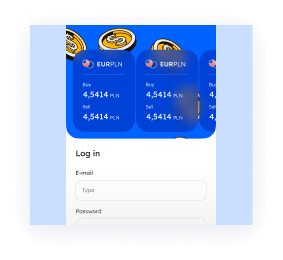
Log in
to the app -
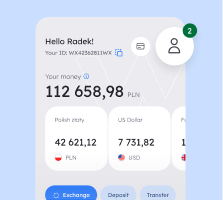
Select the
„My Walutomat” icon -
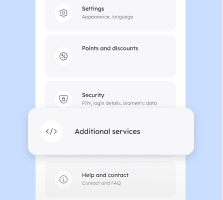
Find the
„Additional Services” tab -
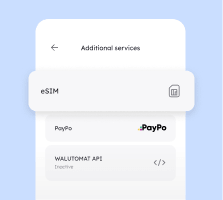
Select „eSIM”
and order an eSIM card
What is an eSIM?
An eSIM is an electronic version of a traditional SIM card. It helps you avoid high charges for using the internet abroad, especially outside the EU.
When you buy an eSIM, you also purchase a data package for use in a specific country or region. The price is usually much lower than that offered by mobile network operators.
An eSIM works on most smartphones. To install it, simply scan the QR code or enter the relevant code in your phone’s settings.
What should you bear in mind?
Install the eSIM before you leave.
The eSIM from Walutomat gives you access to mobile internet, but the package does not include a local phone number.


eSIM-compatible devices
Check out the list of the most popular devices on which you can install an eSIM.
Apple
- iPhone Air
- iPhone 17 Pro Max
- iPhone 17 Pro
- iPhone 17
- iPhone 16e
- iPhone 16 Pro Max
- iPhone 16 Plus
- iPhone 16 Pro
- iPhone 16
- iPhone 15 Pro Max
- iPhone 15 Plus
- iPhone 15 Pro
- iPhone 15
- iPhone 14 Pro Max
- iPhone 14 Plus
- iPhone 14 Pro
- iPhone 14
- iPhone SE 3 (2022)
- iPhone 13 Pro Max
- iPhone 13 Pro
- iPhone 13 Mini
- iPhone 13
- iPhone 12 Pro Max
- iPhone 12 Pro
- iPhone 12 Mini
- iPhone 12
- iPhone SE 2 (2020)
- iPhone 11 Pro Max
- iPhone 11 Pro
- iPhone 11
- iPhone XS Max
- iPhone XS
- iPhone XR

- Google Pixel 10 Pro XL
- Google Pixel 10 Pro
- Google Pixel 10
- Google Pixel 9 Pro Fold
- Google Pixel 9 Pro XL
- Google Pixel 9 Pro
- Google Pixel 9
- Google Pixel 9a
- Google Pixel Fold
- Google Pixel 8 Pro
- Google Pixel 8
- Google Pixel 8a
- Google Pixel 7 Pro
- Google Pixel 7
- Google Pixel 7a
- Google Pixel 6 Pro
- Google pixel 6a
- Google Pixel 6
- Google Pixel 5a
- Google Pixel 5
- Google Pixel 4 XL
- Google Pixel 4a
- Google Pixel 4
- Google Pixel 3a XL
- Google Pixel 3a
- Google Pixel 3 XL
- Google Pixel 3
- Google Pixel 2 XL
- Google Pixel 2
Hammer
- Hammer Explorer PRO
- Hammer Blade 3
- Hammer Blade 5G
- Hammer myPhone NOW eSIM
- Hammer myPhone Hammer Construction
Honor
- Honor 400 Pro
- Honor 400
- Honor 400 Lite
- Honor Magic7 Lite
- Honor 50
- Honor X8
- Honor 90
- Honor Magic6 Pro
- Honor Magic6 Pro RSR
- Honor Magic5 Pro
- Honor Magic4 Pro
- Honor 200 Pro
- Honor 200
- Honor Magic Vs3
- Honor Magic V2
- Honor Magic V3
Huawei
- Huawei Mate 40 Pro
- Huawei P40 Pro
- Huawei P40
Motorola
- Motorola Razr (2025)
- Motorola Razr+ (2025)
- Motorola Razr Ultra (2025)
- Motorola Razr+
- Motorola G52J 5G
- Motorola G52J 5G Ⅱ
- Motorola G53J 5G
- Motorola Moto G (2025)
- Motorola Moto G34
- Motorola Moto G35
- Motorola Moto G53
- Motorola Moto G54
- Motorola Moto G54 Power
- Motorola Moto G55
- Motorola Moto G75
- Motorola Moto G84
- Motorola Moto G85
- Motorola Moto G86
- Motorola Moto G (2024)
- Motorola Moto G Power (2024)
- Motorola Moto G Stylus 5G (2023)
- Motorola Moto G Stylus 5G (2024)
- Motorola Edge Fusion
- Motorola Edge 60
- Motorola Edge 60 Pro
- Motorola Edge 60 Fusion
- Motorola Edge 60 Stylus
- Motorola Edge 50
- Motorola Edge 50 Fusion
- Motorola Edge 50 Pro
- Motorola Edge 50 Neo
- Motorola Edge 50 Ultra
- Motorola Edge 40 Neo
- Motorola Edge 40 Pro
- Motorola Edge 40
- Motorola Edge+
- Motorola Edge+ (2023)
- Motorola Edge (2024)
- Motorola Edge (2023)
- Motorola Edge (2022)
- Motorola Razr 40
- Motorola Razr 40 Ultra
- Motorola Razr 60
- Motorola Razr 50
- Motorola Razr 50 Ultra
- Motorola Razr 2024
- Motorola Razr+ 2024
- Motorola Razr 2022
- Motorola Razr 2019
- Motorola Razr 5G
- Motorola ThinkPhone 25
OnePlus
- OnePlus Open
- OnePlus 11
- OnePlus 12
- OnePlus 13
- OnePlus 13R
Oppo
- Oppo Find X3 Pro
- Oppo Find N2 Flip
- Oppo Find N5
- Oppo Reno 5A
- Oppo Reno 6 Pro 5G
- Oppo Reno 9A
- Oppo Find X5
- Oppo Find X5 Pro
- Oppo A55s 5G
- Oppo Find X8 Pro
- Oppo Find X8
- Oppo Find X3
- Oppo Reno14
- Oppo Reno14 Pro
Others
- Nokia G60 5G
- Nokia X30
- Nokia XR21
- Rakuten Big
- Rakuten Big-S
- Rakuten Mini
- Rakuten Hand
- Rakuten Hand 5G
- Nuu X5
- Fairphone 4
- Fairphone 5
- T-Mobile Revvl 7
- T-Mobile Revvl 7 Pro
- Gemini PDA 4G+Wi-Fi
- Nothing Phone (3a) Pro
- Realme 14 Pro+
- ASUS Zenfone 12 Ultra
- ZTE nubia Flip2
- Alcatel V3 Ultra
- Trump Mobile T1
Samsung
- Samsung Galaxy XCover7 Pro
- Samsung Galaxy A56
- Samsung Galaxy A55 5G
- Samsung Galaxy A54 5G
- Samsung Galaxy A36
- Samsung Galaxy A35 5G
- Samsung Galaxy A23 5G
- Samsung Galaxy Z Flip5
- Samsung Galaxy Z Flip6
- Samsung Galaxy Z Fold
- Samsung Galaxy Z Fold3
- Samsung Galaxy Z Fold5
- Samsung Galaxy Z Fold6
- Samsung Galaxy S25
- Samsung Galaxy S25 Edge
- Samsung Galaxy S25+
- Samsung Galaxy S25 Ultra
- Samsung Galaxy S25 Slim
- Samsung Galaxy S24 Ultra
- Samsung Galaxy S24+
- Samsung Galaxy S24 FE
- Samsung Galaxy S24
- Samsung Galaxy S23 FE
- Samsung Galaxy S23 Ultra
- Samsung Galaxy S23+
- Samsung Galaxy S23
- Samsung Galaxy S22 Ultra
- Samsung Galaxy S22+
- Samsung Galaxy S22
- Samsung Galaxy S21+ Ultra 5G
- Samsung Galaxy S21+ 5G
- Samsung Galaxy S21
- Samsung Galaxy S20 Ultra 5G
- Samsung Galaxy S20 Ultra
- Samsung Galaxy S20+ 5G
- Samsung Galaxy S20+
- Samsung Galaxy S20
- Samsung Galaxy Z Fold5 5G
- Samsung Galaxy Z Fold4
- Samsung Galaxy Z Fold3 5G
- Samsung Galaxy Z Fold2 5G
- Samsung Galaxy Fold
- Samsung Galaxy Z Flip5 5G
- Samsung Galaxy Z Flip4
- Samsung Galaxy Z Flip3 5G
- Samsung Galaxy Z Flip
- Samsung Galaxy A54
- Samsung Galaxy Note 20 Ultra 5G
- Samsung Galaxy Note 20
Sharp
- Sharp AQUOS R10
- Sharp AQUOS R9 Pro
- Sharp AQUOS R9
- Sharp AQUOS R8 Pro
- Sharp AQUOS R8
- Sharp AQUOS R7
- Sharp Simple Sumaho 6
- Sharp AQUOS zero6
- Sharp AQUOS wish3
- Sharp AQUOS wish 2 SHG08
- Sharp AQUOS wish
- Sharp AQUOS sense7 plus
- Sharp AQUOS sense7
- Sharp AQUOS sense6s
- Sharp AQUOS sense4 lite
- Sharp AQUOS sense9
- Sharp AQUOS sense8
Sony
- Sony Xperia 10 III Lite
- Sony Xperia 10 VI
- Sony Xperia 10 V
- Sony Xperia 10 IV
- Sony Xperia 1 VI
- Sony Xperia 1 V
- Sony Xperia 1 IV
- Sony Xperia 5 IV
- Sony Xperia Ace III
- Sony Xperia 5 V
TCL
- TCL 60
- TCL 60 XE NxtPaper
- TCL 50 5G
- TCL 50 NxtPaper
- TCL 50 Pro NxtPaper
- TCL 40 XL
Vivo
- Vivo X200 Pro
- Vivo X200
- Vivo X200s
- Vivo X200 FE
- Vivo X100 Pro
- Vivo X90 Pro
- Vivo V29
- Vivo V29 Lite 5G
- Vivo V40
- Vivo V40 Lite
- Vivo V50
Xiaomi
- Xiaomi 15
- Xiaomi 15 Ultra
- Xiaomi 14
- Xiaomi 14 Pro
- Xiaomi 14T
- Xiaomi 14T Pro
- Xiaomi 13T
- Xiaomi 13T Pro
- Xiaomi 13 Pro
- Xiaomi 13 Lite
- Xiaomi 13
- Xiaomi 12T Pro
- Xiaomi Poco X7
- Xiaomi Redmi Note 14 Pro
- Xiaomi Redmi Note 14 Pro 5G
- Xiaomi Redmi Note 14 Pro+
- Xiaomi Redmi Note 14 Pro+ 5G
- Xiaomi Redmi Note 13 Pro
- Xiaomi Redmi Note 13 Pro+
- Xiaomi Redmi Note 11 Pro 5G
Apple
- iPad Pro 13-inch (M4) Wi-Fi + Cellular
- iPad Pro 12.9-inch (3rd through 6th generation) Wi-Fi + Cellular
- iPad Pro 11-inch (M4) Wi-Fi + Cellular
- iPad Pro 11-inch (1st through 4th generation) Wi-Fi + Cellular
- iPad Air 13-inch (M2) Wi-Fi + Cellular
- iPad Air 11-inch (M2) Wi-Fi + Cellular
- iPad Air (3rd through 5th generation) Wi-Fi + Cellular
- iPad mini (5th and 6th generation) Wi-Fi + Cellular
- iPad (7th through 10th generation) Wi-Fi + Cellular
Samsung
- Samsung Galaxy Tab S9
- Samsung Galaxy Tab S9+
- Samsung Galaxy Tab S9 Ultra
- Samsung Galaxy Tab S9 FE
- Samsung Galaxy Tab S9 FE+
Acer
- TravelMate P2
- TravelMate Spin P4
- TravelMate P6
- Acer Spin 7
- Acer Swift 3
- Acer Swift 7
Asus
- Asus Mini Transformer T103HAF
- Asus NovaGo TP370QL
- Asus Transbook Mini
- Asus VivoBook Flip 14 TP401NA
Dell
- Dell Latitude 7210
- Dell Latitude 9410
- Dell Latitude 9440
- Dell Latitude 7310
- Dell Latitude 7320
- Dell Latitude 7410
- Dell Latitude 9420
- Dell Latitude 9510
- Dell Latitude 5410
- Dell Latitude 5420
- Dell Latitude 5411
- Dell Latitude 5511
HP
- HP Elite Dragonfly G2
- HP Elite Folio 13
- HP Elitebook G5
- HP Probook G5
- HP Zbook G5
- HP Spectre Folio 13
- HP Spectre x360
Lenovo
- Ideapad Flex 5G
- Miix 630
- ThinkPad X1 Titanium Yoga 2 in 1
- ThinkPad X1 Carbon Gen 9
- ThinkPad X1 Fold
- ThinkPad X1 Nano
- ThinkPad X12 Detachable
- X1 Fold
- Yoga C630
- Yoga 520
- Yoga 720 convertible
Samsung
- Samsung Galaxy Book 2
- Samsung Galaxy Book 3
Surface
- Surface Pro 9
- Surface Pro 8
- Surface Pro 7+
- Surface Go 3
- Surface Go 2
- Surface Pro LTE
- Surface Pro X
- Surface Pro 5 LTE Advanced
- Surface Duo 2
- Surface Duo
eSIM vs. physical SIM card
Wondering which type of SIM card to choose? Here’s a comparison of both solutions.
| eSIM | Physical SIM card | |
|---|---|---|
| Form | A virtual card that connects to your phone via a built-in chip. | A plastic card (nano/micro/mini). |
| Instalation time | Remote instalation (e.g. by scanning a QR code). | Insert the card into the device. You must purchase a physical card in-store, which may prolong the instalation process. |
| Security | Lower risk of theft or loss (it is always in your phone). | It can be removed from your phone and used in another device, or lost. |
| Number of cards on a single device | You can instal several cards on a single device. | One or two, if your phone has a Dual SIM function. |
| Compatibility | Requires a modern device – a smartphone or smartwatch that supports this technology. | It also works on older phone models. |
| Convenience whilst travelling | The option to quickly top up with a local data bundle. | You need to buy a local SIM card, which usually only works in one country. |
| Environmental friendliness | A fully digital solution, which is more environmentally friendly. | Generates plastic waste. |

eSIM refund guarantee
Can’t travel to your chosen destination? Last-minute change of plans? Don’t worry – you can return your unused card and get your money back. We’ll only charge a small fee, equivalent to $0,50.

24/7 Support
Would you like to find out more about Walutomat’s eSIMs? Are you interested in a specific data package or need help installing the SIM? Please contact our Customer Service team. Our advisers are available every working day from 8.00 am to 8.00 pm.
eSIM card – frequently asked questions
How does the Walutomat eSIM work?
Walutomat’s eSIM card gives you convenient internet access in many countries around the world. It only takes a few clicks to order one via the Walutomat app. You can choose from data packages for use in a specific country or region (e.g. Africa, the Balkans, Latin America). The eSIM works on the vast majority of smartphones. Once you’ve ordered the eSIM, you’ll receive an email with installation instructions. Our eSIMs, like most such cards on the market, are designed for internet use. They do not have a dedicated phone number. Making calls or sending text messages is done via your standard SIM card. If you have several SIM cards and an eSIM in your phone, you can specify in your phone’s settings which card should be used for the internet connection.
Who is the eSIM card for?
An eSIM with a mobile data plan is a service for people travelling abroad. Data roaming charges with our operator can be very high, especially in exotic countries. An eSIM with a mobile data plan tailored to a specific country or region allows you to significantly reduce this cost.
How can I check if my device supports eSIM?
Method 1 – entering a code
On your phone’s numeric keypad, enter: *#06#
The screen will display the device’s identification details (IMEI, EID, SN numbers, etc., and barcodes). Look for the number labelled EID (Embedded Identity Document). If you see an EID number (usually 32 digits) in the list, along with a QR code or barcode next to it, this means your device has an eSIM module. The absence of an EID number usually indicates that the device does not support this technology.
Method 2 – checking in the system settings
On Android:
- Go to Settings.
- Select Connections or Network & Internet.
- Tap SIM Card Manager or SIM Cards.
- If you see the option ‘Add eSIM’ or ‘Download SIM card’, your phone supports this feature.
On iOS (iPhone):
- Go to Settings.
- Select Mobile Network.
- Check whether the „Add eSIM” (or „Add mobile plan”) option is available below the list of physical SIM cards.
Method 3 – checking via a search engine or AI assistant
Type the name of your device and „eSIM support” into the search bar or chat window, e.g. „Xiaomi Redmi Note 145G eSIM support”. When browsing the search results, it’s best to visit the official websites of your phone’s manufacturer.
How do I install an eSIM?
You can install the eSIM on your phone using a QR code or a special LPA code. You’ll see these on the screen of our app immediately after purchasing the eSIM. We’ll also send them to you in the email confirming your eSIM purchase.
Scanning the QR code will start the installation process. To install the card using the LPA code, go to your phone’s settings. Find the section where you can set your mobile network operator, go to the eSIM settings and tap ‘Add new eSIM’. Enter the LPA code in the relevant field.
How do I check the balance of my eSIM data package?
Open the Walutomat app. Go to the „Additional Services” section -> „eSIM”. Tap the plan you’re interested in – you’ll see your current usage in the details.
Can I return an eSIM card?
You can return the eSIM card if it has not yet been activated. Activation involves connecting to a local network operator in the destination country. Activation also takes place automatically 60 days after purchase. For Global data plans, activation may take place immediately after the card is installed in your phone in any country covered by the Global data plan.
How do I activate the eSIM so that the internet works abroad?
Install the eSIM card with your data plan on your phone. Switch on „Data roaming”. Upon arrival in your destination country, activate our eSIM card and set it as your data card. The card will activate automatically once it connects to the local operator’s network. The names of the options may vary depending on your phone’s make and operating system version.
Can I share my eSIM with someone else?
You can purchase several eSIMs from your account for family or friends. To transfer an eSIM to the person of your choice, give them the LPA code or an email containing the QR code.
In which countries can I use a Walutomat eSIM?
Walutomat’s eSIM cards cover a total of over 200 countries. Regional cards are also available, allowing you to use mobile data in multiple countries as part of a single package.
Which countries are covered by the Asia and Oceania regional eSIM?
The Asia and Oceania regional eSIM covers: Australia, China, Hong Kong, Indonesia, Japan, Macau, Malaysia, New Zealand, Philippines, Singapore, South Korea, Taiwan, Thailand, Vietnam.
Which countries are covered by the Europe regional eSIM?
The Europe regional eSIM covers: Austria, Belgium, Bulgaria, Croatia, Cyprus, Czech Republic, Denmark, Estonia, Finland, France, Germany, Gibraltar, Greece, Hungary, Iceland, Ireland, Italy, Latvia, Liechtenstein, Lithuania, Luxembourg, Malta, Netherlands, Norway, Poland, Portugal, Romania, San Marino, Slovakia, Slovenia, Spain, Sweden, Switzerland, United Kingdom, Vatican.
Which countries are covered by the Balkan regional eSIM card?
The Balkan regional eSIM covers: Albania, Bosnia and Herzegovina, Bulgaria, Croatia, Greece, Hungary, Kosovo, Montenegro, North Macedonia, Romania, Serbia, Slovenia, Turkey.
Which countries are covered by the South-East Asia and Oceania regional eSIM?
The South-East Asia and Oceania regional eSIM covers: Australia, Indonesia, Malaysia, New Zealand, Philippines, Singapore, Thailand, Vietnam.
Which countries are covered by the Caribbean regional eSIM?
The Caribbean regional eSIM covers: Anguilla, Antigua and Barbuda, Bahamas, Barbados, British Virgin Islands, Cayman Islands, Dominica, Grenada, Jamaica, Montserrat, Netherlands Antilles, Saint Kitts and Nevis, Saint Lucia, Saint Vincent and the Grenadines, Turks and Caicos Islands.
Which countries are covered by the North America regional eSIM?
The North America regional eSIM covers: Canada, Mexico, United States.
Which countries are covered by the Latin America regional eSIM?
The Latin America regional eSIM covers: Argentina, Bolivia, Brazil, Chile, Colombia, Costa Rica, Ecuador, El Salvador, Guatemala, Honduras, Mexico, Nicaragua, Panama, Paraguay, Peru, Uruguay, Venezuela.
How many eSIMs can I have at the same time?
You can have up to 20 eSIMs at the same time on Walutomat. This limit includes cards you’ve purchased, those awaiting activation, and those you’re currently using. Inactive cards (expired or used up) do not count towards this limit.
What should I do when my data bundle runs out?
You can monitor your data usage in real time via the app. You can top up with another data package at any time.
Discount voucher for new customers!
Enter your email address and we will send you a 50% discount codea
for the commission on your first exchange.
Receive an e-mail!
We have sent you an email with a 50% discount code for the commission on your first exchange! Click on the link in the email and register to use the discount.